
The weaving functionality in Connect supports the full production flow for woven fabric, from order creation to production reporting. It is designed to handle both flat fabric and tubular fabric, while supporting multi-panel (parallel rolls or cuts) production. In tubular weaving, the product width is expressed as the 'lay flat width'.
Note: Although tubular fabric is woven in a circular shape, the machine is still considered a weaving machine. Tubular weaving machines should not be confused with circular knitting machines, as knitting and weaving are different fabric manufacturing processes.
This article provides an overview of the modules used in Connect for weaving production and explains how these modules work together throughout the production process.
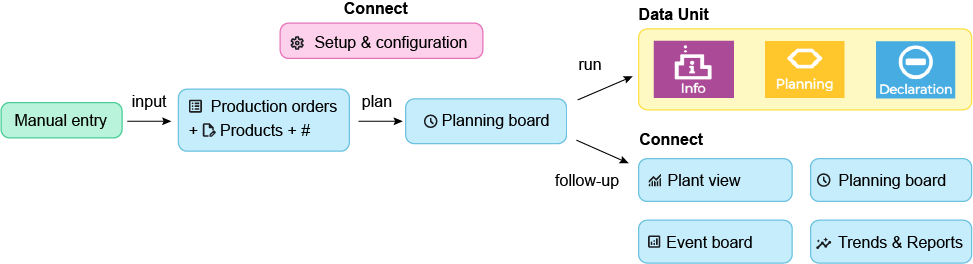
Setup & configuration
Before using Connect for weaving production, the machines must be connected to your Connect subscription. The BMSvision installation team:
- Adds the weaving machines to your Connect subscription.
- Configures and installs the required Data Units.
- Ensures communication between the machines and Connect.
After the installation, you only need to configure the machines in Plant view. See Configuring a weaving machine.
For system-wide configuration options, refer to the System settings articles.
Creating production orders
After configurating the required Weave products, production orders can be created manually in the Weaving orders module. See Weave products and Weaving orders.
Planning a production order
If a machine is assigned while the production order is defined, the order is automatically put at the end of the planning queue. Without machine assigned, the production order must be planned manually on a machine with the Planning board. See Planning board.
The Planning board shows:
- The planned production orders and their status.
- The orders that are executing.
- The orders that have been executed.
Orders can be dragged to the planning queue of a compatible machine. Connect only allows planning on machines that can produce the selected product.
- For single-panel production, the product width must be less than or equal to the machine width.
Product width ≤ Machine width. - For multi-panel production, the total required width must be less than or equal to the machine width:
Product width × Number of panels ≤ Machine width.
Running the order
On the Data Unit that is installed on the machine, buttons are available to do the following:
- Info button: View the status and KPI's of the active production order.
- Declaration button, e.g. to give a specific reason why the machine stopped.
- Planning button: See the planning queue, end a production order, start an order from the queued orders.
See the below attachments.
Monitoring the order and machine
The MONITORING section in the menu includes the key modules Plant view, Event board and Reports that are essential for real-time and historical analysis of your production. See Plant view, Event board, Reports.
Using a Data Unit
To use a DU1, DU3 Type II, DU9, DU11 or DU15 Data Unit with Connect for weaving machines, refer to the documentation attached to this article (see bottom). One manual is for the DU1; the other manual is for the other types. These documents explain:
- How to process production orders.
- How to monitor production.
- How to handle stops.