
This article describes the activation stage of your Connect account. This is done by signing our Terms and Conditions in the Connect Admin module (https://admin.texconnect.io/). Administrators are asked to sign Terms and Conditions via an e-mail and via a pop-up.
For a general description of the Connect Admin module, see the article Administration getting started.
E-mails
When a company orders a Connect account, all administrators receive an e-mail to sign the Terms and Conditions. A subscription can be used as soon as the Terms and Conditions of that subscription have been signed by an administrator.
If the Terms and Conditions change, each administrator receives a notification e-mail and has at least 14 days to read and sign the new Terms and Conditions. The changes are described at the bottom of this article.
Attention: If the Terms and Conditions for a subscription are not signed within this 14 day period, the subscription will be locked. All users will lose access (Access denied is shown) until the administrator completes the signing process.
Pop-ups
When Terms and Conditions need to be (re)signed, every user, including administrators will get a pop-up when opening Connect. The changes to the Terms and Conditions are described at the bottom of this article.
Administrators
You can do one of the following:
- Click the link to view the terms and conditions and then click the button Accept and continue to sign them.
- Click Cancel to continue working with Connect and sign later.
If you have more than one subscription, check them all for Terms and Conditions to be signed. The text is the same for each subscription, but signing is required per subscription.
Regular users
You can do one of the following:
- Click the link to view the Terms and Conditions.
- Click Continue to Connect.
The pop-up suggest to contact one of your administrators to sign the Terms and Conditions. To know who your administrators are:
- Open https://admin.texconnect.io/ and log in.
- Click View subscriptions, select your subscription and see the Users list.
Administrators are marked with .
. - To see the contact details of the administrator, click the Edit button
 .
.
How to sign via Connect Admin
- Open Connect Admin: https://admin.texconnect.io/
- Click View subscriptions.
- Select your subscription.
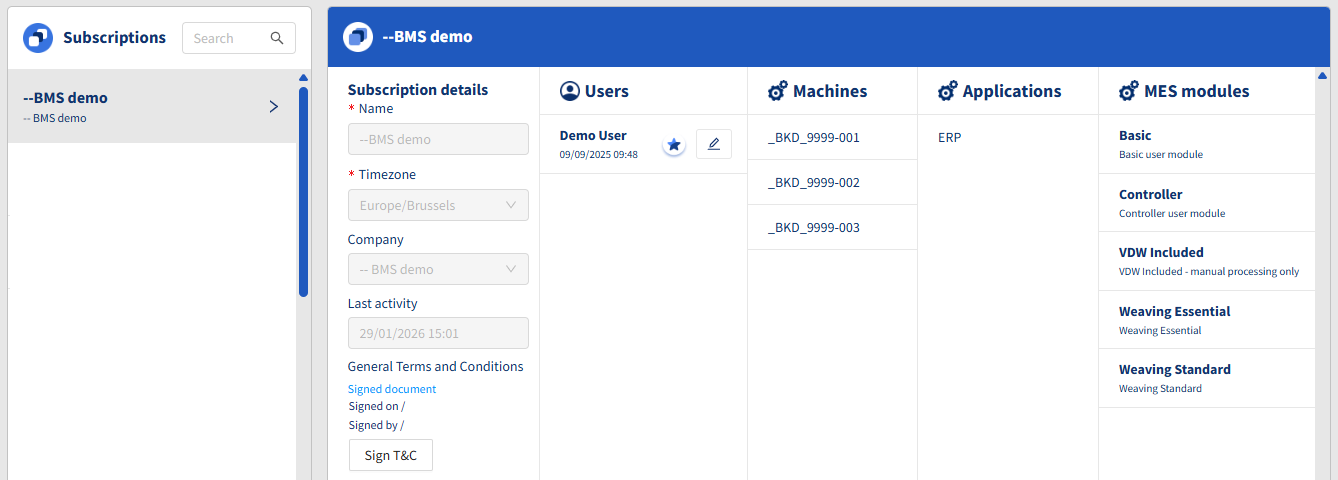
- Under Subscription details, click Signed document to download the Terms and Conditions for reading.
- Click Sign T&C to sign.
- Log out and log in again.
Viewing the signed Terms and Conditions
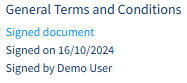
In the Subscription details in Connect Admin, you can see who signed when.
Changes
Here is a description of the changes to the Terms and Conditions.
February 2026
- The platform is now provided by BMSvision who is the licensed software partner of Vandewiele under the Connect name. This means that the previous Vandewiele/TEXconnect Terms and Conditions are replaced by the new BMSvision/Connect Terms & Conditions.
- The Terms & Conditions now fully comply with European Economic Area (EEA) and GDPR data‑protection requirements. These changes strengthen transparency, clarify responsibilities, and ensure that all data processing activities meet the latest regulatory standards.