
The Calendar modules are used to define work shifts, non-working times, holidays and breaks.
Shifts are shown in the time line of the Planning board as blue bars. Hovering over a bar displays the shift code and time. This helps you align your planning with the defined shifts.
The Calendar consists of following modules:
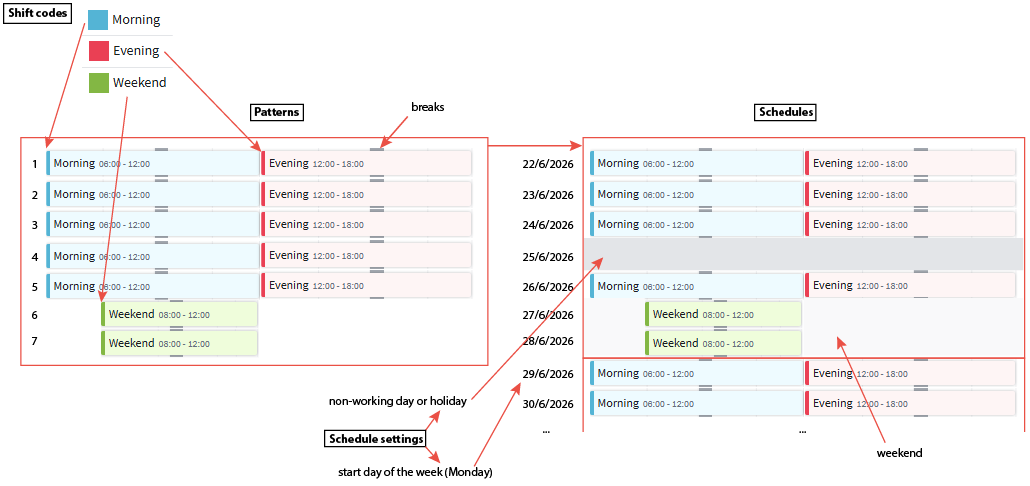
Shift codes: Unique identifiers for different types of shifts. (for example morning, evening and weekend shifts).
Patterns: Recurring sequences of shift codes that define the order and timing of shifts over a period, including breaks.
Schedules: Apply patterns to the calendar, define non-working days, and assign shift patterns to machines.
In the Schedules module, you can define general Schedule setting, such as the start day of the week and holidays. These apply to all schedules.
The image below shows how the modules are related and how shifts, breaks, weekends, non-working days, holidays and visualized.
The Calendar modules are available in the section RESOURCES under Calendar. Refer to the following articles for more details about these modules:
- Shift codes
- Patterns
- Schedules (Schedule settings are also described in this article)
Note: Either you have this Calendar available in the RESOURCES section or the Regimes settings available in Plant view under Machine settings.