
Custom settings are entered in this Production order settings window of the Carpet order module (under Production orders in the SCHEDULING section):
- If you don't have orders yet, the Production order settings window opens.
- If you have orders, click Custom settings
 in the list view.
These settings will be used for new carpet orders that are created in Connect (not those created via ERP or on the machine), unless the new carpet order has the same machine, quality and creel as a previous confirmed carpet order, then the settings of that carpet order are used instead of these custom settings.
The default settings in the red boxes below can be overridden in the Configure step when creating a carpet order. The other settings are common settings that are the same for all carpet orders.
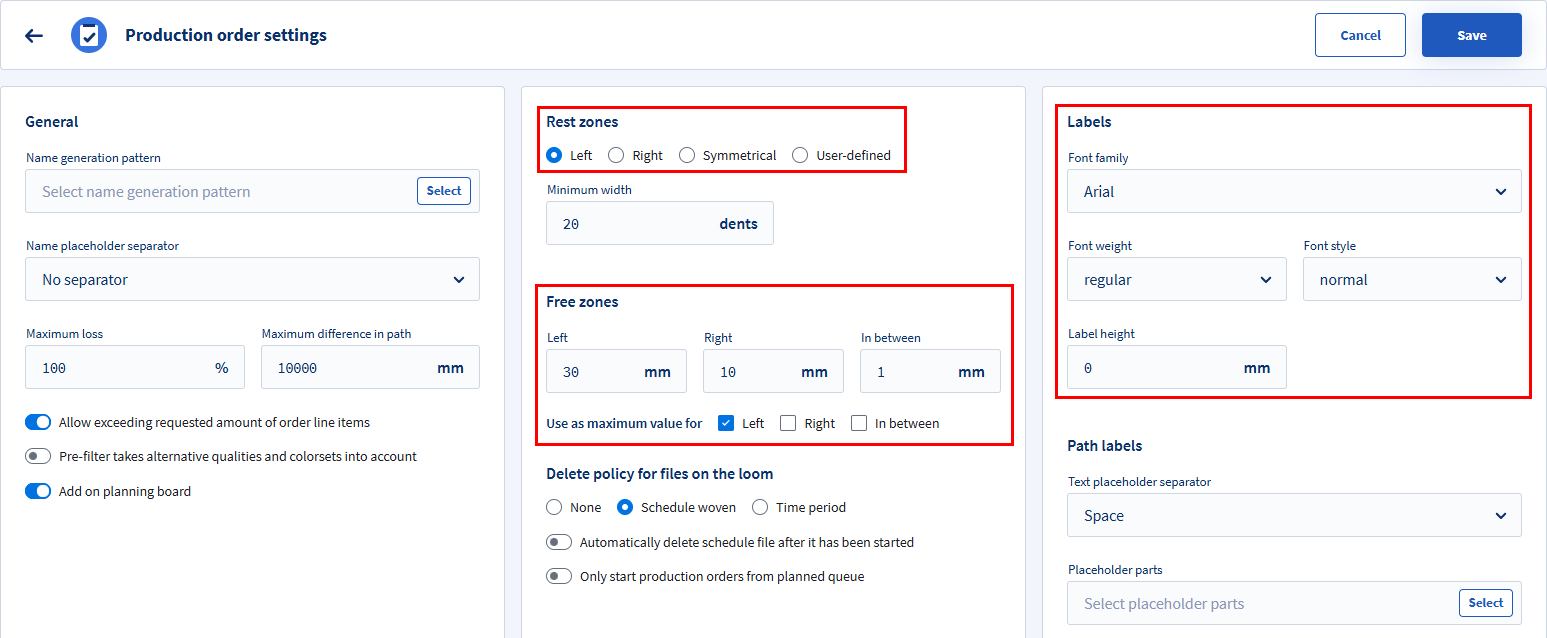
Left pane
- Define the Name generation pattern and Name placeholder separator for the carpet order name. See Name generation pattern for more information.
- Maximum loss:
Percentage of waste that is allowed to be produced. When exceeded, a notification will appear in the Verify step. - Maximum difference in path:
Maximum allowed length difference between the paths. - Allow exceeding requested amount of order line items:
Include a safeguard and choose if the requested amount of order lines from the ERP system may be exceeded.
- Pre-filter takes alternative qualities and color sets into account:
Choose if carpet orders should show alternative qualities for the selected quality or not.- Alternative qualities are defined in the Qualities module (under Definitions > Quality related in the SCHEDULING section).
- Alternative color sets are defined in the Color sets module (under Definitions > Yarn related in the SCHEDULING section).
- Add on planning board:
Choose if the order should be added on the planning board or not.
Middle pane
- Minimum width (dents):
A rest zone is only created if the number of rest dents is larger than this value. If the number of rest dents is lower, the rest dents are distributed over the existing free zones.
This value is the default for all carpet production orders and cannot be overridden. - Delete policy for files on the loom:
Files stored on the loom can be deleted to prevent the weaver from accidentally producing the same order more than once or to free up disk space. Please note that this action only affects future operations. Deleting a file will apply starting from the next executed order and does not retroactively impact previously processed orders.
Options to specify if and when all files of an order should be deleted from the loom:- None: Don't automatically delete the files (default).
- Schedule woven: Delete the files after starting the next order.
- Time period: Delete the files x days after starting the next order.
- Automatically delete schedule files after it has been started:
Choose if the schedule file should be deleted as soon as it is started (instead of when you start the next order). This only deletes the order itself so the weaver can't weave the same order twice. Use in combination with the above setting if you also want to cleanup the EPS of that order after weaving it. - Only start production orders from planned queue:
Allow or prevent that production orders can be started that are not in the planned queue.
Right pane
- Labels:
These values are used as default for the Configure step of a carpet order creation and can be overridden there. - Path labels:
Define the name generation pattern for the path label. See Name generation pattern for more information.