
This article describes the quality settings for carpet and velvet machines. The settings are available via the Qualities module:
- Open the Qualities module: under Definitions (section SCHEDULING), open Quality related, then Qualities.
- In the top right corner, click
 and the Settings.
The Quality settings consist of two tabs:
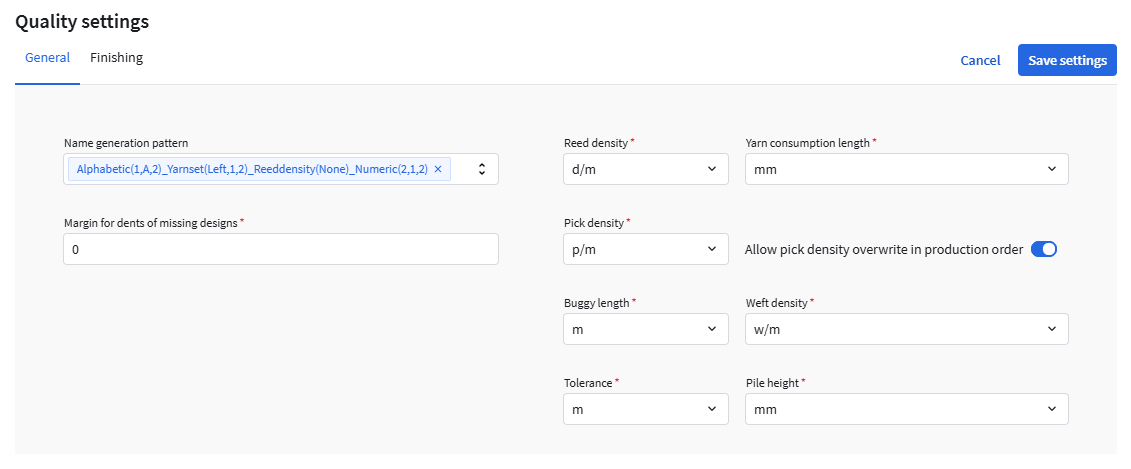
General tab
Fields marked with a red asterisk (*) are mandatory.
| Name generation pattern | Defines the automatic naming pattern for qualities. See this article: Name generation pattern. |
| Margin for dents of missing designs * | The maximum allowed difference in dents when updating design dimensions (e.g. through ERP).
|
| Reed density * | Sets the unit used for displaying reed density values. Reed density is the number of dents per meter in the reed and determines the width resolution of the woven cloth. Typical values: 320–500 d/m. |
| Yarn consumption length * | Sets the unit for yarn consumption length calculations when computing how much yarn is needed for a production order. |
| Pick density * | Sets the unit for pick density values (picks per length unit). |
| Allow pick density overwrite in production order | Use this option to control whether the Practical pick density may be changed in a carpet production order.
|
| Buggy length * | Sets the unit for buggy length to m or picks. |
| Weft density * | Sets the unit for weft density (wefts per length unit). |
| Tolerance * | Sets the unit for length/width tolerances used in production order verification. |
| Pile height * | Sets the unit for pile height to mm or cm. |
Finishing tab
| Name generation pattern | Defines the automatic naming pattern for finishings that can be created in the Finishings tab when creating a quality. See this article: Name generation pattern. |