
Weaving-specific production order settings define how weaving orders are created and managed in Connect. These settings ensure consistency in naming and support multi-panel production scenarios.
The Production order settings are available via the Weaving orders module under Production orders in the SCHEDULING section. In the top right corner, click  and then Settings.
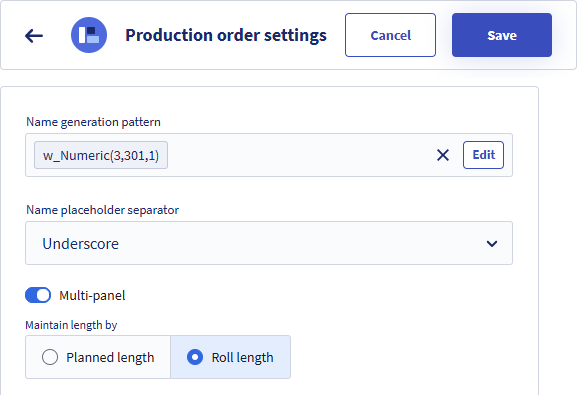
Production order name
For the Name generation pattern and Name placeholder separator, see the article Name generation pattern.
Multi-panel
Enable/disable
The Multi-panel setting controls whether production orders can be created for products that use multi-panel production.
Multi-panel production refers to the simultaneous production of multiple panels (also known as parallel rolls or cuts) on a weaving machine. All panels are produced with the same length.
- Enabled: Production orders can be created for multi-panel products.
- Disabled: Production orders are limited to single-panel production only.
Length management
When multi-panel is enabled, you must define how the production length is managed.
- Planned length:
The entered length represents the total length across all panels combined.
Example: Total planned length 4000 m, Number of panels 4 => Length per panel 1000 m. - Roll length:
The entered length represents the length of a single panel. The system automatically calculates the total planned length.
Example: Roll length 1000 m, Number of panels 4 => Total planned length = 4000 m.
The Number of panels is entered when creating the production order. The selected Production order settings determines whether the user enters the Planned length or the Roll length.