
Products that are produced on weaving machines can be created manually in the Weave products module. This article explains how to create and configure weave products.
The Weave products module is available under Definitions in the SCHEDULING section. If it is the only products module, it's name will be Products.
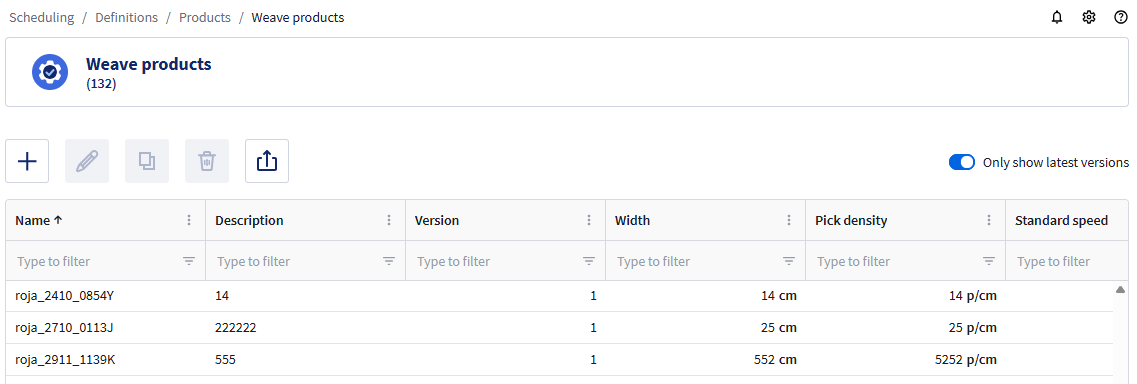
This module shows a table with the products that have been created.
Creating a product
To create a product:
- Click the Create new button +.
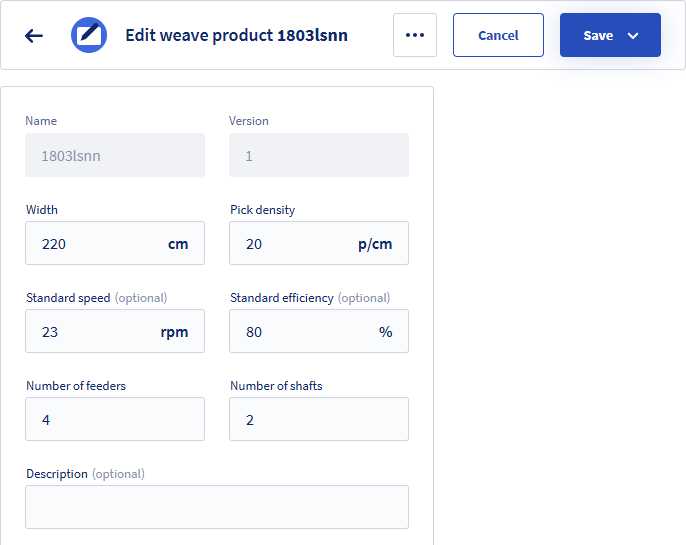
- Enter or select values. Fields marked with * are required.
For a description of the fields, see below. - Click Save.
You can also click Save and close to return to the list or Save and create new to create more.
Fields
| Name * | Enter a unique name for the weave product. |
| Version | When a product is modified and saved, a new version is created automatically. |
| Width * | Width of the fabric. For tubular fabric, enter the lay flat width. This value is used when determining whether a product can be planned on a machine. |
| Pick density * | Number of picks per cm. Pick density determines the fabric construction and is used to calculate production times. |
| Standard speed | Specifies the machine’s default operating speed and is used to estimate the production time of a Production order. When left blank, the Standard speed of the selected Machine is used. |
| Standard efficiency | The expected production efficiency. This value is used to estimate the production time of a production order. When left blank, the Standard efficiency of the Machine will be used. |
| Number of feeders * | A product can only be planned on machines that have at least this number of feeders available. |
| Number of shafts * | A product can only be planned on machines that have at least this number of shafts available. |
| Description | Free field for a description of the weave product. |
Versioning
Versioning is supported for weave products. When a product is modified and saved, a new version is created automatically. Existing production orders continue to use the previous version, while new production orders can use the new version.
By default, only the most recent version of each product is displayed in the product list. To view all versions, clear the Only show latest versions option.
Versioning allows you to:
- Keep a history of product changes.
- Compare older and newer versions of a product.
- Continue using previous product versions for historical production orders.