
This article describes the technical prerequisites of the CPS ERP integration and explains how weave structures, qualities, finishings, and colors are handled by Connect.
Technical prerequisites
As part of the CPS ERP integration for carpet, with the CpsLinkToConnect-module, BMSvision needs to execute specific queries on the customer’s database while the customer continues to run their own database operations in parallel.
To ensure stable and reliable coexistence of all database activities, the customer environment must meet a set of technical prerequisites covering platform requirements, database configuration, firewall rules, and server security.
Please review the requirements detailed below carefully. Verifying and, if necessary, adjusting these prerequisites in advance will ensure compatibility, prevent integration issues, and allow all queries, both on the customer side and on the BMSvision side to function correctly.
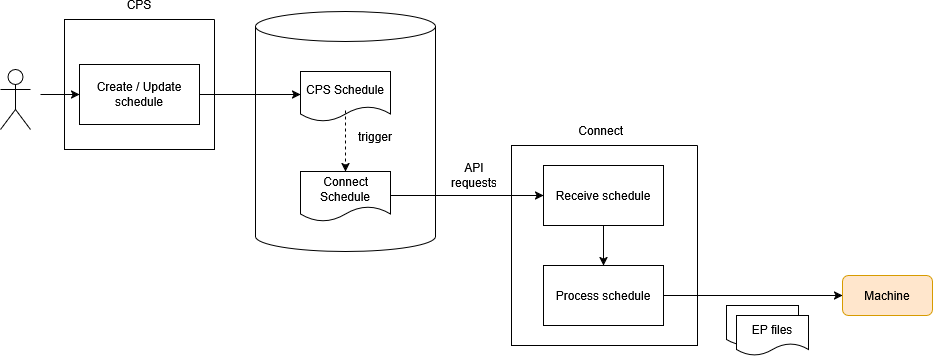
Installation of the CpsLinkToConnect-module requires compliance with these prerequisites:
Firewall configuration
- Allow inbound TCP traffic on the database port (default: 1433) from the BMSedge to the SQL-server.
SQL-server requirements
- Version: Microsoft SQL Server 2019 CTP 2.0 (build 895) or higher.
- Database compatibility level: 150 or higher.
- Ensure that TCP/IP connections are allowed to the SQL-server.
- Provide a database user account with SELECT and INSERT permissions on:
- The CPS database
- The logging database (both may reside in the same database)
More info:
View or change the compatibility level of a database
More details about Compatibility levels
Server security requirements
- Transport encryption:
- TLS 1.2 must be enabled and enforced.
- Certificates:
- Must comply with SSL security level 2 at a minimum.
- SSL security level 3 is recommended.
More info:
SSL Security Level
Weave structure and quality handling
Ensure that all weave structures that are used in CPS are available in Connect.
The weave structure name must match between CPS and Connect (for example: SiC_D2008). Name matching is case‑insensitive.
Quality definition from CPS
In CPS, a quality name can be specified together with the following required parameters:
- Reed density.
- Pick density.
- Practical pick density.
- Weave structure name.
Quality creation and versioning rules:
- If the quality does not exist in Connect, it will be automatically created.
- If the quality already exists:
- If parameters are different and the quality is not yet in use, the existing quality will be overwritten.
- If parameters are different and the quality is already in use, a new version of the quality will be created with the updated parameters.
- All existing parameters that are not provided or overwritten by CPS are always preserved.
Order item overrides
At the level of order items (designs within a production order), the following overrides are possible:
- An alternative weave structure can be specified per order item.
If not specified, the weave structure defined at production order quality level is used. - A finishing code can be provided per order item.
This code becomes the name of the finishing that is added to the quality.- CPS defines only a finishing of type 'none' with a cutbar before and after length.
- You can create additional finishing types with advanced parameters directly in Connect.
If the finishing name matches the name provided by CPS, that existing finishing definition will be used.
Colors and order lines
- Per order item, a main and border color can be specified in CPS.
These colors are used to generate the corresponding order lines in the order book. - CPS also provides a color set name.
This color set is automatically created in Connect with standard colors.