Machines can be configured via Plant view (section MONITORING): select a machine and at the bottom of the pane that appears, click the Edit button  . The dialog that then appears depends per machine type.
 This article describes the settings for a Carpet Loom machine types.
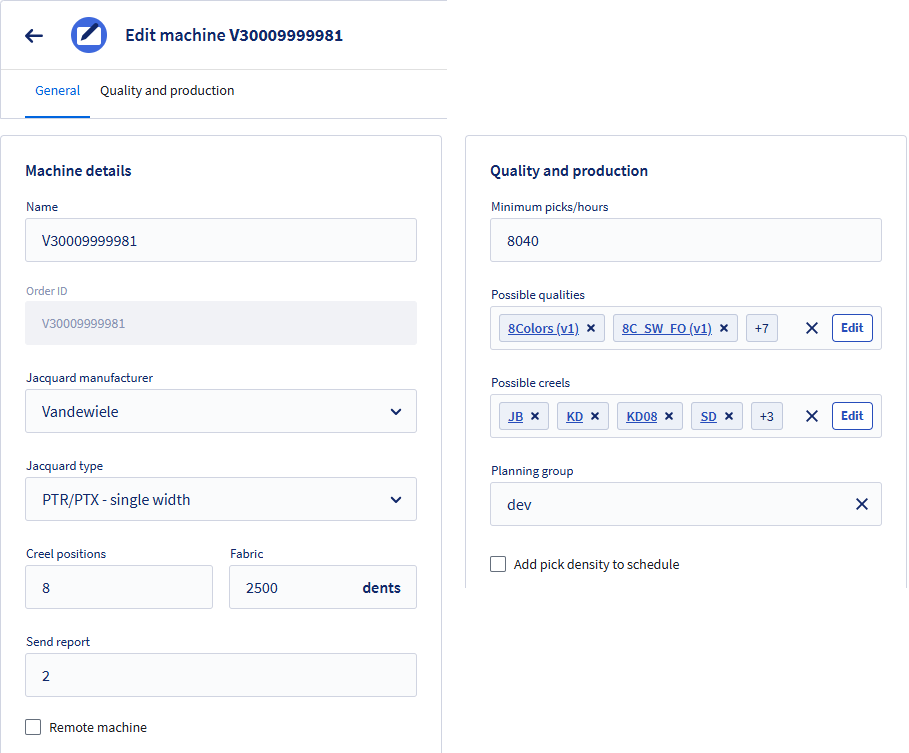
The carpet loom configuration consists of two tabs.
General tab
- Name:
Enter a name for your machine or click Apply to use the naming suggestion.
The naming generation pattern can be configured via the Settings button .
. - Order ID:
The unique order number of your machine. Starts with V for this machine type. - Jacquard manufacturer:
Select one of the supported manufacturers. - Jacquard type:
Select a jacquard type (depends on the selected Jacquard manufacturer). - Creel positions:
Enter the number of pile yarns that can weave within a single dent. - Fabric:
Enter the number of dents that can be planned for on this machine. - Send report:
The number of picks at which the loom can be restarted:- For weave structures with a 1/2 V, 2/2 V, 2/3 V, the send report is 2.
- For weave structures with a 1/1 V, 1+1/2 V, 1+2/3 V, the send report is 4.
- Remote machine:
Check if the machine is not connected. For such machines, the design can be processed in Connect and transferred via a USB stick, but they cannot be monitored nor planned.
Quality and production tab
- Minimum picks/hour:
Enter the minimum production speed for your machine. This standard speed parameter will be used in the planning to estimate production order times. - Possible qualities:
Select the qualities that can be produces on the machine. - Possible creels:
Select the creels that can be used with the machine. - Planning group:
Is used to group machines if you want to use Connect for planning. Enter a tag to group machines of the same planning group. If you do not need the Connect planning, just enter Default.- If the tag is new, 'Group will be added' will appear.
- If the tab already exists, that message does not appear.
- Add pick density to schedule:
This checkbox is only available for Vandewiele Jacquard PTR/PTX machine types (both single and double width machines) and is on by default.
When sending a production order to a machine, Connect includes the pick density defined in the order. If you want to maintain the pick density that was entered on the machine, clear this checkbox.
This option is specifically provided for these machine types because their HMI does not have a built-in setting to prevent the pick density from being overwritten by a production order.